
How to Use Voloco Free Plugin – A Comprehensive Guide
Table of Contents
Introduction to Voloco Free Plugin
The Voloco Free Plugin by Resonant Cavity is a pitch correction tool available as a VST3 and AU plugin for digital audio workstations (DAWs) on PC and Mac. Originally developed for mobile platforms, Voloco has evolved into a desktop-compatible plugin that combines simplicity, creativity, and the power to produce the iconic “T-Pain” effect. This guide explores its features, usage, and potential in music production.
How to Use Voloco?
Embracing Pitch Correction as Art
Unlike subtle pitch correction tools designed to refine vocals discreetly, Voloco celebrates bold, robotic, and creative tuning effects. It transforms vocal recordings into musical pieces with perfect pitch, resonating with a futuristic allure reminiscent of T-Pain’s signature sound.
Tailored for Creative Expression
Voloco is not just a technical tool but an instrument for innovation. By offering predefined presets, it invites users to explore and experiment, making it ideal for both beginners and seasoned producers seeking unique vocal effects.
Features of Voloco Free Plugin
1. Six Pitch-Correction Modes
The plugin includes six distinct presets, each fine-tuned to deliver variations of the T-Pain auto-tune effect. These presets determine the speed and intensity of pitch correction, allowing users to quickly achieve professional-sounding results without extensive adjustments.
2. User-Friendly Controls
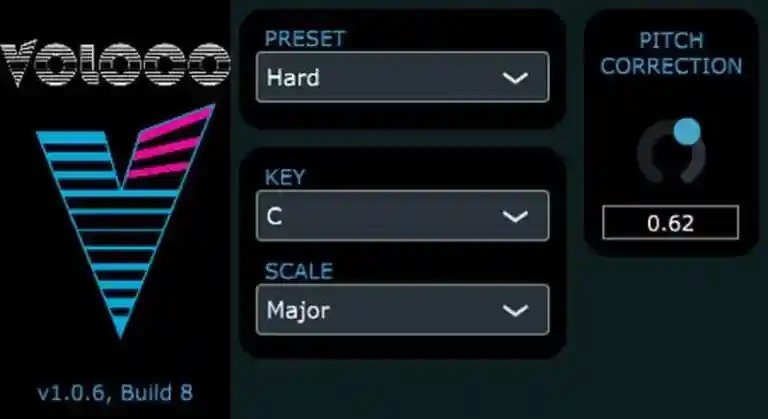
Voloco’s interface simplifies the pitch correction process. Key features include:
- Key and Scale Anchoring: Lock your vocals to a specific musical key and scale.
- Pitch Correction Adjustment: Control the intensity of the pitch effect to suit your artistic vision.
3. Mobile and Desktop Compatibility
Initially available on iOS and Android, Voloco has expanded its presence to desktop platforms, making it accessible to traditional music production setups while retaining its mobile convenience.
A Glimpse into Voloco Pro How to Use Voloco?
The upcoming Voloco Pro version promises greater control and customization:
- Advanced Sound Engine Controls: Fine-tune pitch correction parameters.
- Enhanced User Experience: Tailored tools for professional-level production.
Until its release, users can explore the robust capabilities of the free version.
How to Use Voloco Plugin Effectively
- Download and Install: – https://resonantcavity.com/
- Access Voloco through the Resonant Cavity website or app stores.
- Install the plugin on your preferred DAW (PC or Mac).
- Load Voloco in Your DAW:
- Open a vocal track and add Voloco as an audio effect.
- Select the desired preset and set the key and scale.
- Adjust Pitch Correction:
- Use the intensity slider to refine the effect.
- Experiment with different presets for creative outcomes.
- Export and Share:
- Once satisfied, export your track to showcase your work.
Voloco’s Evolution from Mobile to Desktop
Origins on Mobile Platforms
Voloco debuted as a mobile app, offering intuitive pitch correction on iOS and Android. Its portability made it popular among content creators and musicians experimenting with vocal effects on the go.
Transition to Desktop
The desktop versions, available in VST3 and AU formats, expanded Voloco’s audience, integrating seamlessly into professional DAWs like Logic Pro, Ableton Live, and FL Studio.
Beyond the Software: Voloco in Action
Voloco encourages users to go beyond technicalities, inspiring vocalists and producers to explore the boundaries of pitch correction. While often seen as an experimental tool, it has the potential to craft unique and compelling musical pieces.
FAQ: Mastering the Voloco Free Plugin
What is Voloco?
Voloco is a pitch correction plugin designed for DAWs on PC and Mac. Known for its “T-Pain” effect, it delivers bold, robotic vocal tuning, ideal for creative music production.
How do I install Voloco?
- Download the plugin from the Resonant Cavity website.
- Install it on your DAW (compatible with VST3 and AU formats).
- Load it onto your vocal tracks and start experimenting.
Can I customize pitch correction settings?
The free version of Voloco offers presets with fixed parameters but allows users to adjust pitch correction intensity and anchor vocals to a key and scale. The upcoming Pro version will provide more customization options.
Is Voloco suitable for professional production?
While primarily seen as an experimental tool, Voloco’s unique pitch correction capabilities can be creatively integrated into professional music production.
Can I use Voloco on mobile devices?
Yes, the mobile versions for iOS and Android are free to download and offer similar pitch correction features as the desktop versions.
What are the key features of Voloco?
- Six pitch-correction presets.
- User-friendly interface.
- Compatibility with mobile and desktop platforms.
What is the difference between Voloco Free and Pro?
The free version includes predefined presets with limited control. The Pro version, currently in development, will allow more in-depth customization of pitch correction parameters.
How can I achieve the T-Pain effect?
Load Voloco onto your vocal track, select a preset optimized for the T-Pain effect, and adjust the pitch correction intensity to match your style.
What makes Voloco different from other plugins?
Voloco embraces bold and creative vocal effects, making it more than a technical tool—it’s an instrument for innovation and experimentation.
Where can I download Voloco?
Voloco is available on the Resonant Cavity website for desktop versions and app stores for mobile devices.
By blending accessibility with creativity, Voloco empowers musicians to reimagine vocal production, transforming simple recordings into bold, futuristic soundscapes. Whether you’re a novice or a seasoned producer, Voloco invites you to explore its potential and push the boundaries of pitch correction.
Find My Labels, find Record Label Send Your Demo | findmylabels.com |
SM Mastering | Mix & Master Services smmastering.com